1K, 2K or 4K: Which Resolution Do You Need for Client Presentations?
One image in 1K, upscaled by the same model to 2K and 4K: the same crop compared, which resolution you need where, a print calculation, prices and the “Download in 4K” button.
· 5 min read · CreateViz AI
The higher the resolution, the more an image costs and the longer the wait. But do you always need 4K? We made one evening living room in 1K, upscaled it with the same model to 2K and 4K and compared the same crop. Below: which resolution you need where, and what it costs.
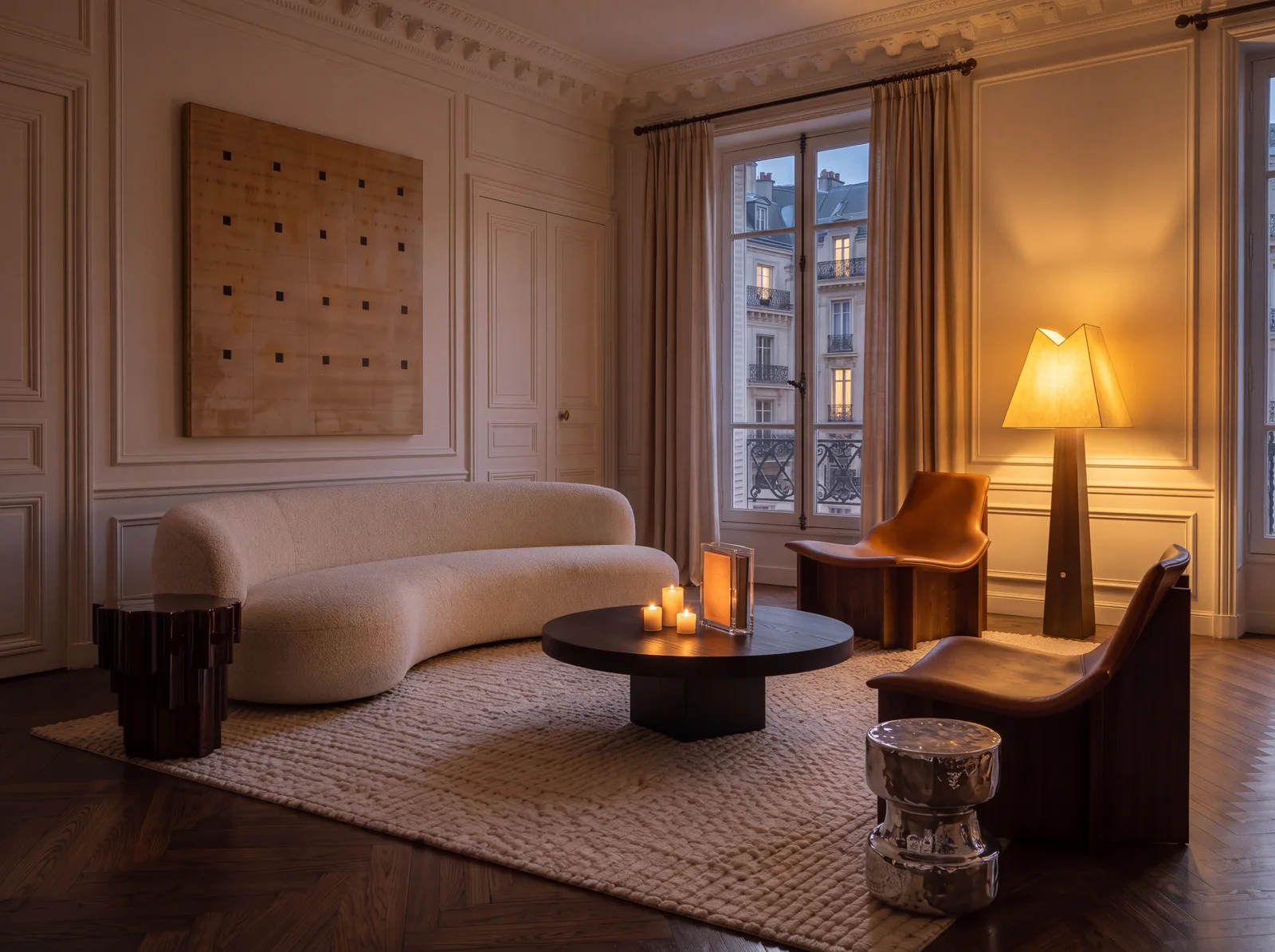
Final 4K image, Nano Banana 2.1
One crop in 1K, 2K and 4K
We cut out the same spot – a leather armchair and a silver side table – and show it at the same size. That's what a detail looks like if you zoom in on screen or print it large.
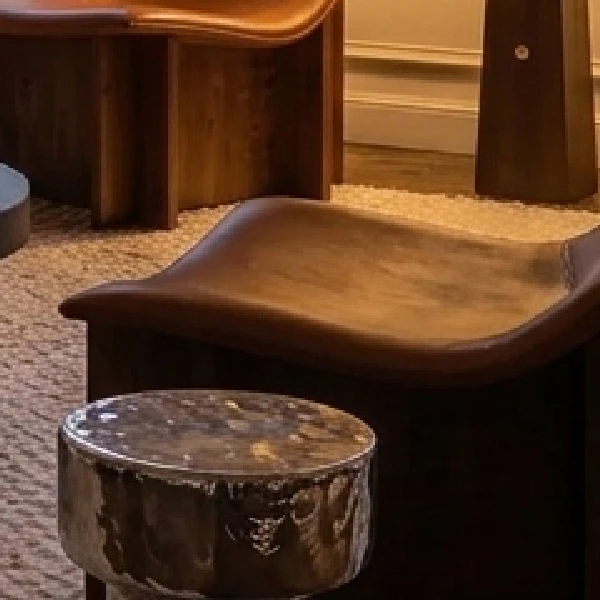
1K
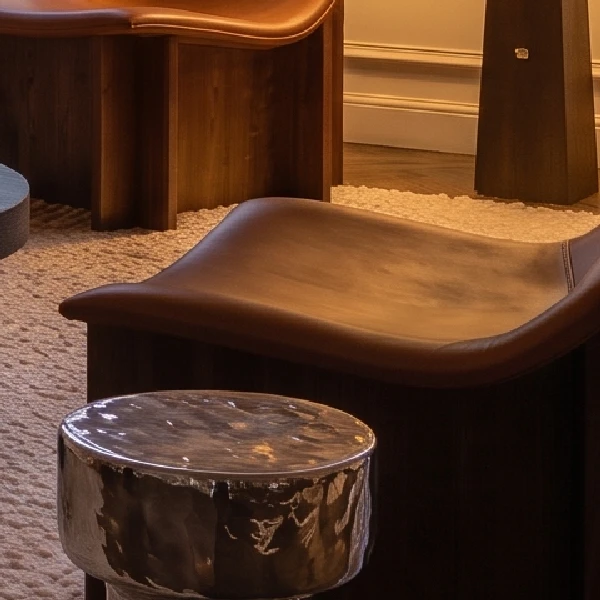
2K
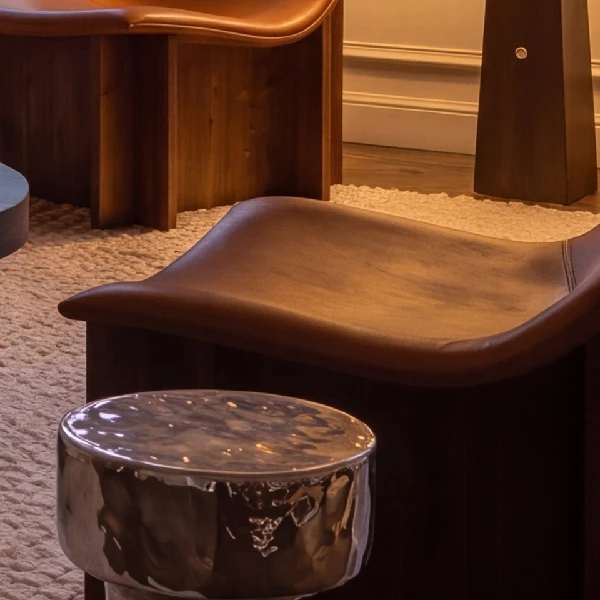
4K
- 1K – zoomed in, everything is soft and edges are jagged. Seen whole on a phone screen, the image looks fine.
- 2K – sharp, the rug and wood texture are visible. Enough for a laptop screen and a presentation.
- 4K – you can see the stitching on the leather and the hammered metal. Needed when someone will examine the detail.
- Honestly: when upscaling, the model redraws the image rather than stretching it – so the tones shifted slightly (the light is a bit cooler in 4K), and tiny details like the button on the floor lamp may differ a little. The furniture, layout and materials stayed the same.
Which resolution where
| Resolution | Pixels (4:3) | For |
|---|---|---|
| 1K | 1200 × 896 | Drafts, exploring ideas, a messenger message |
| 2K | 2400 × 1792 | Laptop and monitor screens, a PDF presentation, social media, small prints |
| 4K | 4800 × 3584 | Print at A3 and larger, TVs and projectors, close-up crops, a portfolio |
Pixels are from the images in this article (Nano Banana 2.1, 4:3). Other models and formats differ slightly.
What each resolution costs
| Model | 1K | 1.5K | 2K | 4K |
|---|---|---|---|---|
| Nano Banana Pro | – | – | 10 credits ($0.37) | 15 credits ($0.55) |
| GPT Image 2.5 | – | – | 5 credits ($0.18) | 10 credits ($0.37) |
| GPT Image 2.6 | – | 5 credits ($0.18) | – | – |
| Nano Banana 2.1 | 3 credits ($0.11) | – | 5 credits ($0.18) | 6 credits ($0.22) |
| Nano Banana 2 Lite | 2 credits ($0.07) | – | – | – |
In brackets – in money on the Start plan.
1K is available in Nano Banana 2.1, Nano Banana 2 Lite; 4K – in Nano Banana Pro, GPT Image 2.5, Nano Banana 2.1. GPT Image 2.6 has no choice – 1.5K: 1536 pixels on the long side. Nano Banana Pro starts at 2K: the most careful model doesn't do 1K drafts.
Choose first, upscale later
There's no need to make every variant in 4K. It's easier to look for the option in 1K or 2K and upscale the one you like with “Download in 2K / 4K” – the same model redraws it at a larger size, the composition stays.
| Model | Upscale to 2K | Upscale to 4K |
|---|---|---|
| Nano Banana Pro | – | 10 credits ($0.37) |
| Nano Banana 2.1 | 4 credits ($0.15) | 5 credits ($0.18) |
Other models have no upscale – only “Download”.
Example: a Nano Banana 2.1 1K draft costs 3 credits, upscaling the chosen one to 4K – 5 credits. Straight to 4K – 6 credits for each variant.
A 1080 vs 4K comparison on another project – with a slider on the AI interior rendering page. What images cost overall – in the article “How much does an AI interior render cost?”.
FAQ
What resolution do I need for a client presentation?
2K is enough for screens and PDFs. 4K is for printing at A3 and above, large screens and close-up crops when you zoom into a detail. 1K is for drafts and exploring ideas.
Is AI 4K a real resolution or an upscale?
In CreateViz AI the 4K image is drawn by the model itself – with new detail, not stretched. The “Download in 4K” button on a finished image also redraws it with the same model at a larger size.
Will the image be more accurate in 4K?
No. The composition, furniture and materials stay the same – 4K adds sharpness and fine detail but doesn't fix the model's mistakes. Pick a good variant first, then upscale.