Redesign a Room from a Photo with AI: What to Expect
Three real examples: finishing a renovation from a site photo, changing the style and a portfolio shot. What AI holds firmly, what it changes unasked, how to photograph the room and write the request.
· 6 min read · CreateViz AI
Uploading a room photo and seeing it with new furniture or in another style is the most common request to interior AI. It works well, but it isn't magic: some things the AI holds firmly, others it changes unasked. Here are three real examples of what to expect and how to get predictable results.
1. Renovation in progress – show the finished room
A photo of a bathroom under renovation: a bare wall, wires, a sink cutout. The request is to finish it: cladding, fixtures, lighting. Below are two different requests for the same photo: the first with brass, a vessel sink and a black toilet, the second with a round backlit mirror and white fixtures.
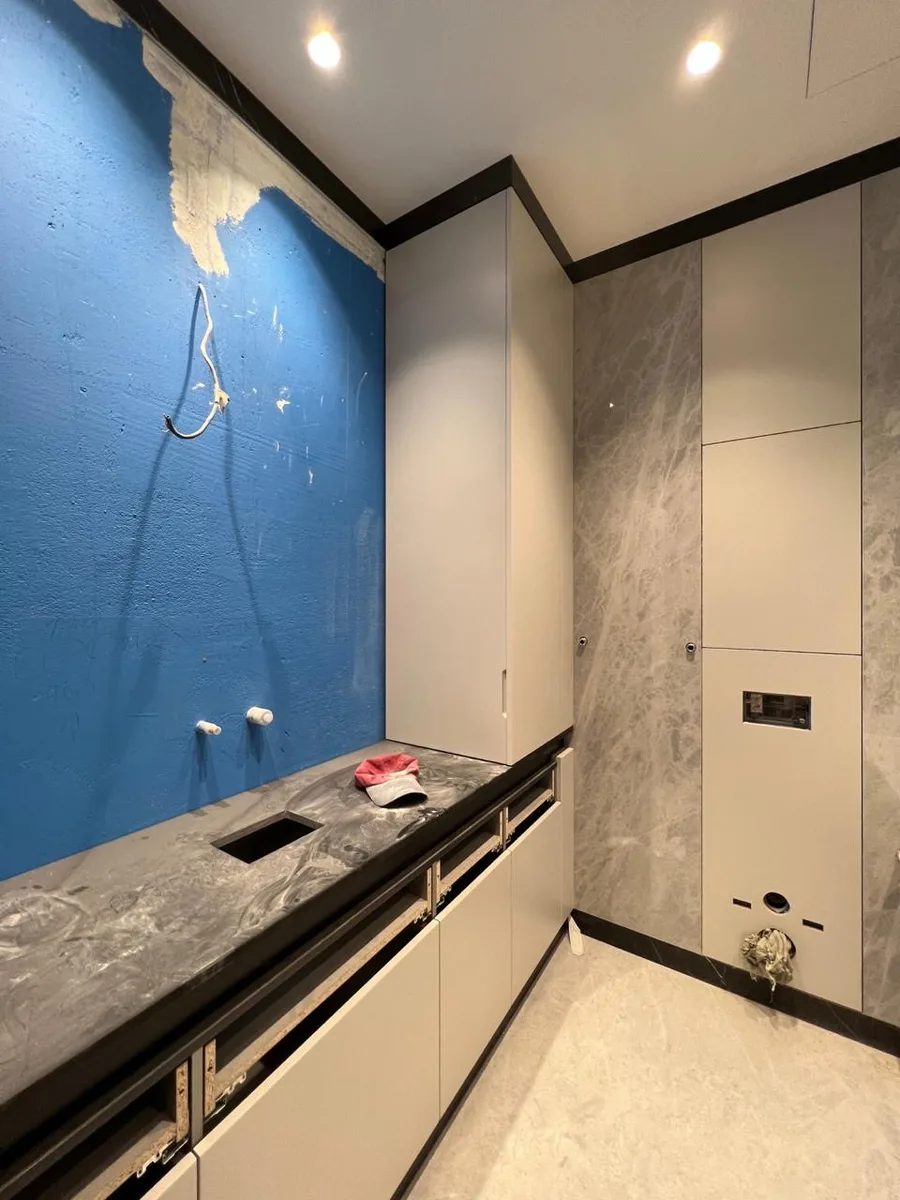
Site photo
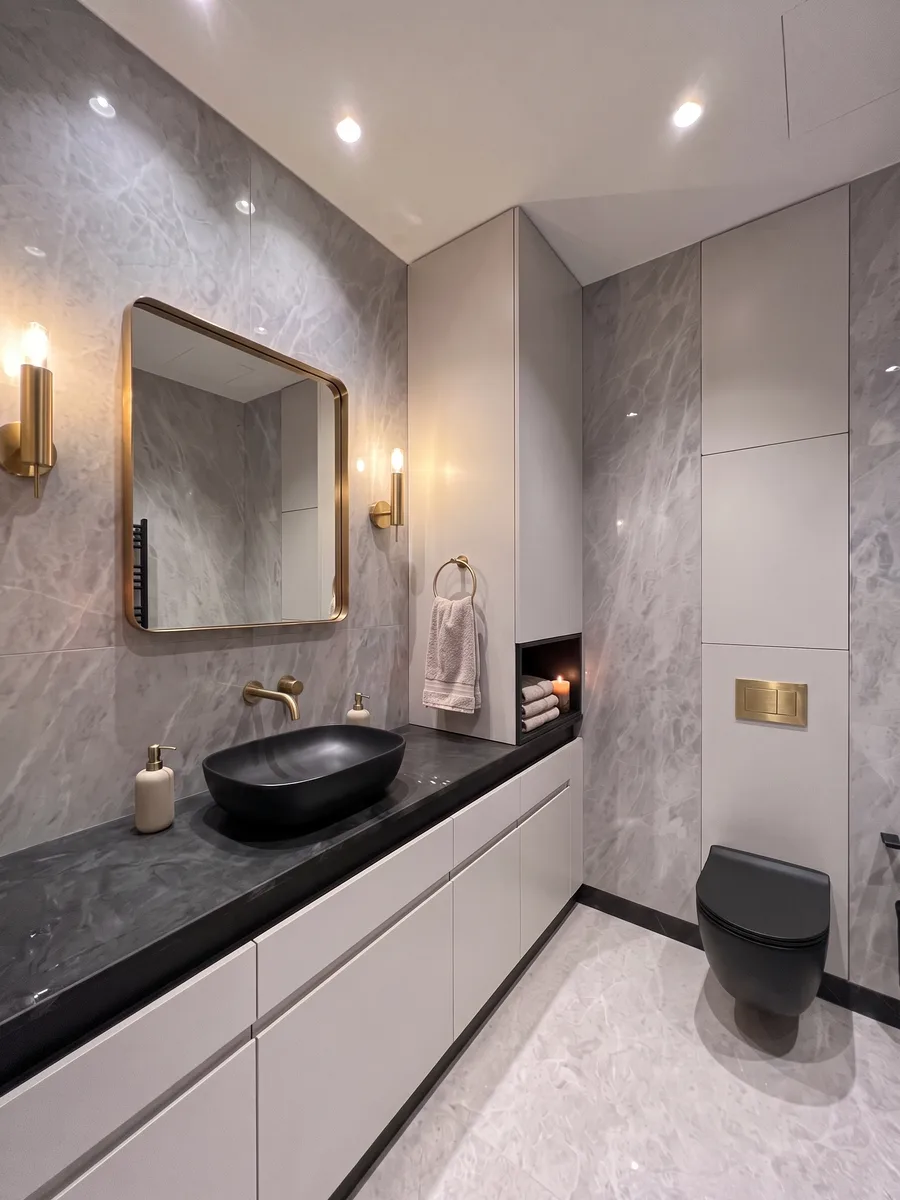
Request 1
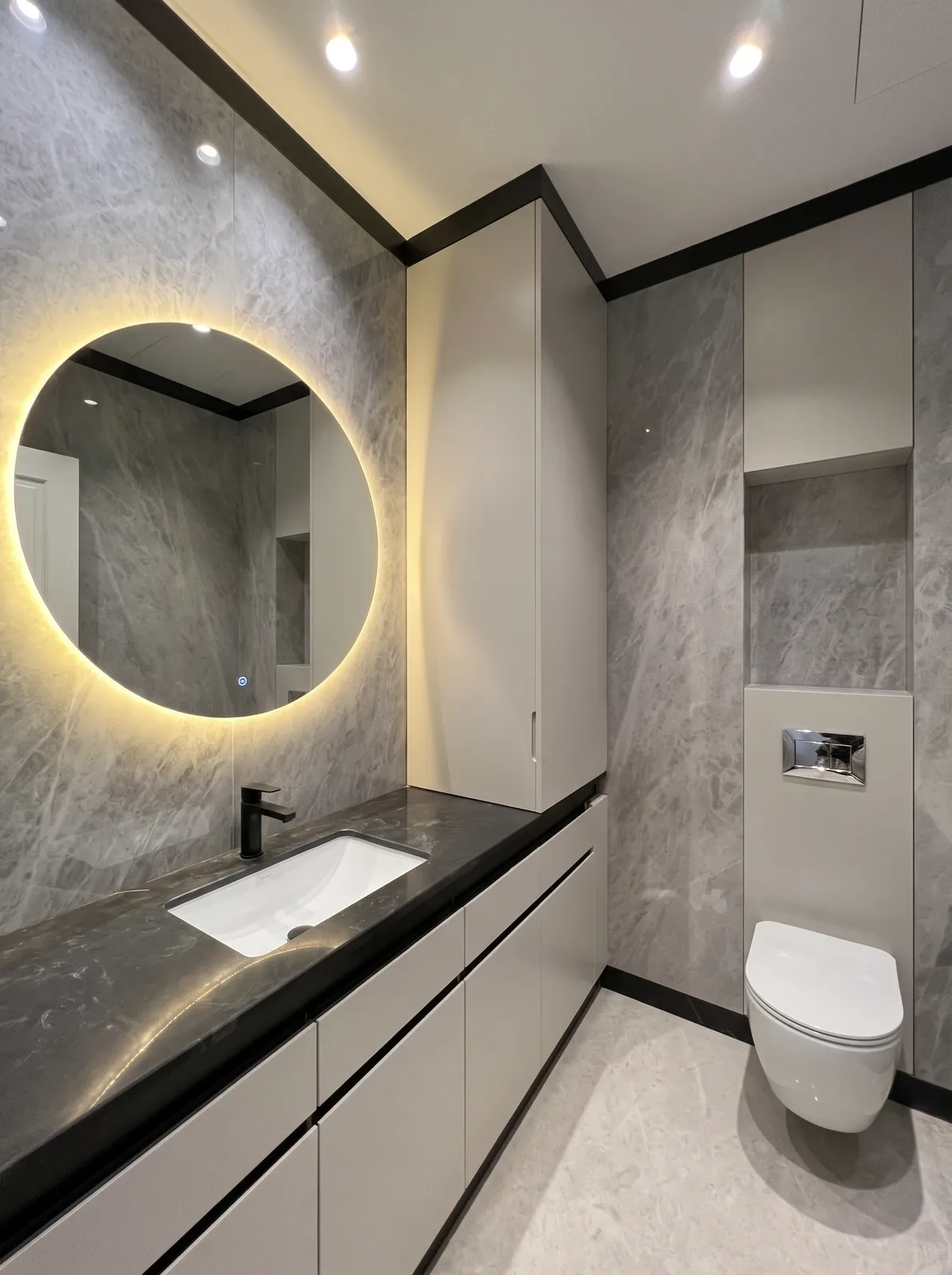
Request 2
What you can see: everything already built stays in place. Everything requested appears. But in the first variant the AI removed the black ceiling trims and cut a niche into the cabinet – you need to notice this and ask to restore it if needed.
2. A finished room – a different style
A photo of a finished room with a grey sofa. The request: Japandi – a light oak sofa, linen curtains and cushions, a graphic artwork, a vase with branches. We asked to keep the walls, window, cornice, sconce and parquet.
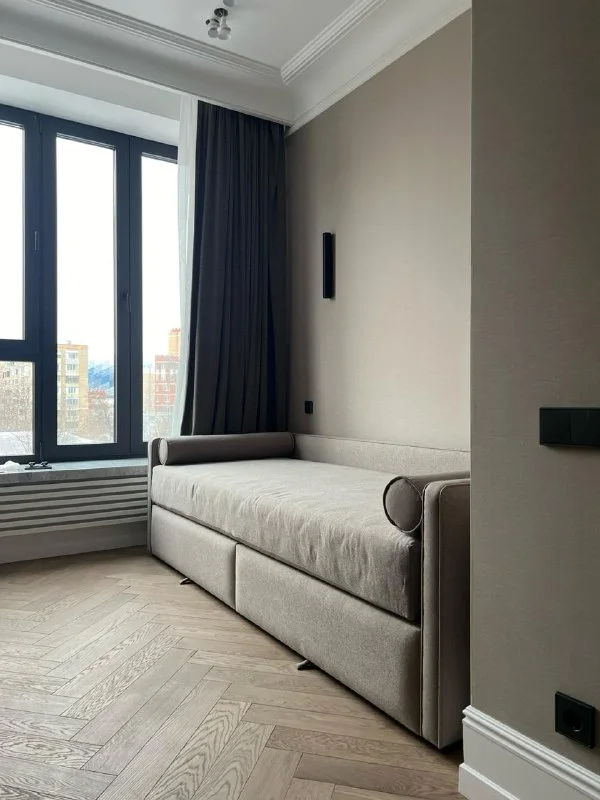
Room photo
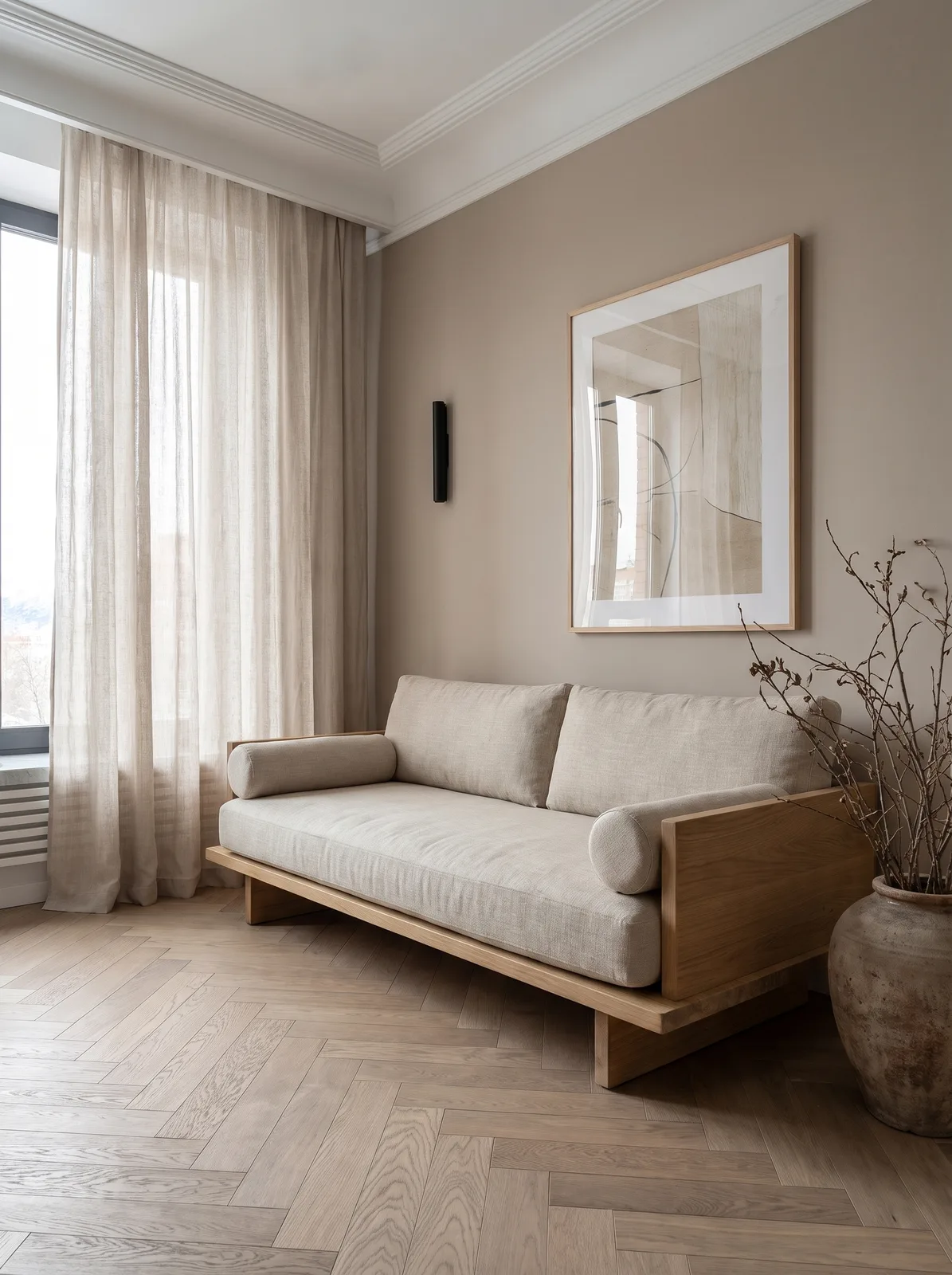
Japandi, Nano Banana Pro
Wall color, cornice, sconce and parquet match the photo. The new furniture and textiles are as requested. But unasked, the AI removed the wall pier on the right along with the switch and socket, and shifted the camera slightly. A client who knows their room will notice – check such spots.
3. Site photo – a portfolio shot
The same room, but a different goal: keep the furniture, just “style” the shot – sheer curtains, an artwork, cushions, a throw, soft light. That's how a site photo becomes a portfolio or social media shot without a photographer or stylist.
Phone photo
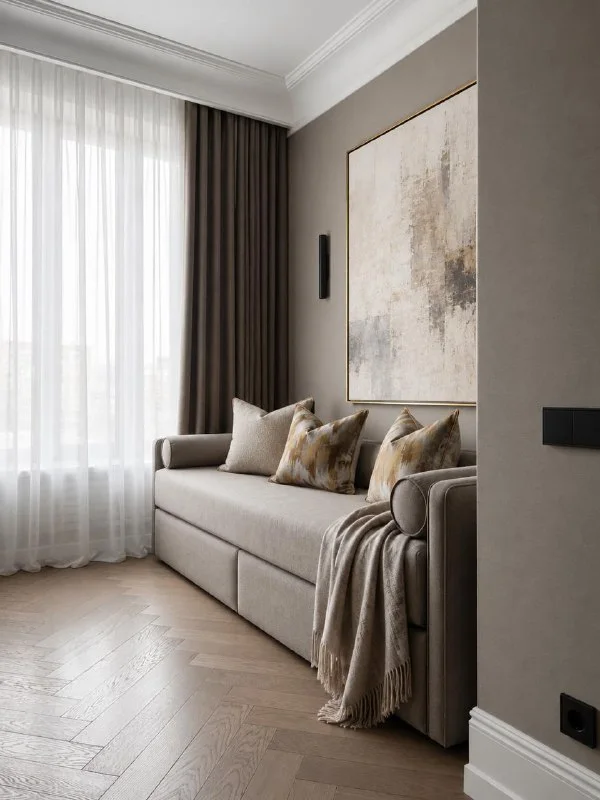
Portfolio shot
What stays and what may change
| Usually stays | May change unasked |
|---|---|
| Walls, windows, doors, ceiling | Wall piers, sockets, switches, trims |
| Camera angle | A slight camera shift or turn |
| Built-in furniture and finishes | Small finish details: trims, skirting, niches |
| What's named in the request | Decor “of its own”: flowers, books, vases |
How to photograph the room
- During the day, in natural light, with lamps off – the AI reads materials better.
- From a corner or the doorway, at eye level, with a level horizon.
- The phone's regular lens, no fisheye: strong distortion may be “straightened” in unexpected ways.
- No need to tidy up – just write “remove clutter and debris”.
How to write the request
Three parts in this order:
- What to keep: “keep the angle, walls, windows, ceiling and floor”.
- What to change: specific pieces, materials and colors – “replace the grey sofa with a light oak sofa with linen cushions”.
- Light and look: “soft daylight from the window, photorealistic, no people, no text”.
Ready-made requests by room and task – on the interior prompts page. Which model to choose – in the article “Same request, three AI models”.
What it costs
One image costs from 2 credits ($0.07) in Nano Banana 2 Lite to 10 credits ($0.37) in Nano Banana Pro on the Start plan. 3–5 images are usually enough: a couple of drafts in an affordable model and the final one in the model that keeps details better. Pricing.
How it works in the service and more examples – on the AI room design page.
FAQ
Can I get an interior design from a photo of my room?
Yes: upload a photo, write what to change, and the AI shows the room with new furniture, finishes or in another style. It's a visualization of the idea, not a project with drawings: dimensions and details are still the designer's job.
Will the AI keep the room layout?
Usually yes: walls, windows, ceiling and camera angle stay. But it may remove or add small elements – a wall pier, a socket, a door trim. If they matter, say what to keep in the request and check the result against the source.
Can I put specific furniture in the room?
Yes. Attach photos of the pieces along with the room photo – up to 8 photos per request, depending on the model – and name them in the text: “the sofa from the second photo against the left wall”. If the image is already done and you need to swap one piece, use “Edit part” under it: paint over the piece and attach a photo – the rest stays the same.
How much does a room redesign from a photo cost?
One image costs from 2 credits (Nano Banana 2 Lite) to 15 credits (Nano Banana Pro, 4K); on the Start plan that's $0.07 to $0.55. 3–5 images are usually enough to find an option.
Will a phone photo work?
Yes, every example in this article was shot on a phone. What matters is a level horizon, daylight and the whole room in frame without strong wide-angle distortion.