Case Study: A Bathroom Visualized from a Construction-Site Photo
A photo of a bathroom mid-renovation → two finish directions → a close-up → evening light in Nano Banana Pro. Time and cost of each step, what the AI changed unasked and how a failure played out.
· 6 min read · CreateViz AI
A bathroom mid-renovation: a bare wall, wires, a sink cutout. The client can't picture the result, and a 3D visualization is a week away. We took this photo through the whole process in CreateViz AI – two finish directions, a choice, a close-up and evening light – and recorded the time, the cost and everything that didn't go to plan.
The source photo
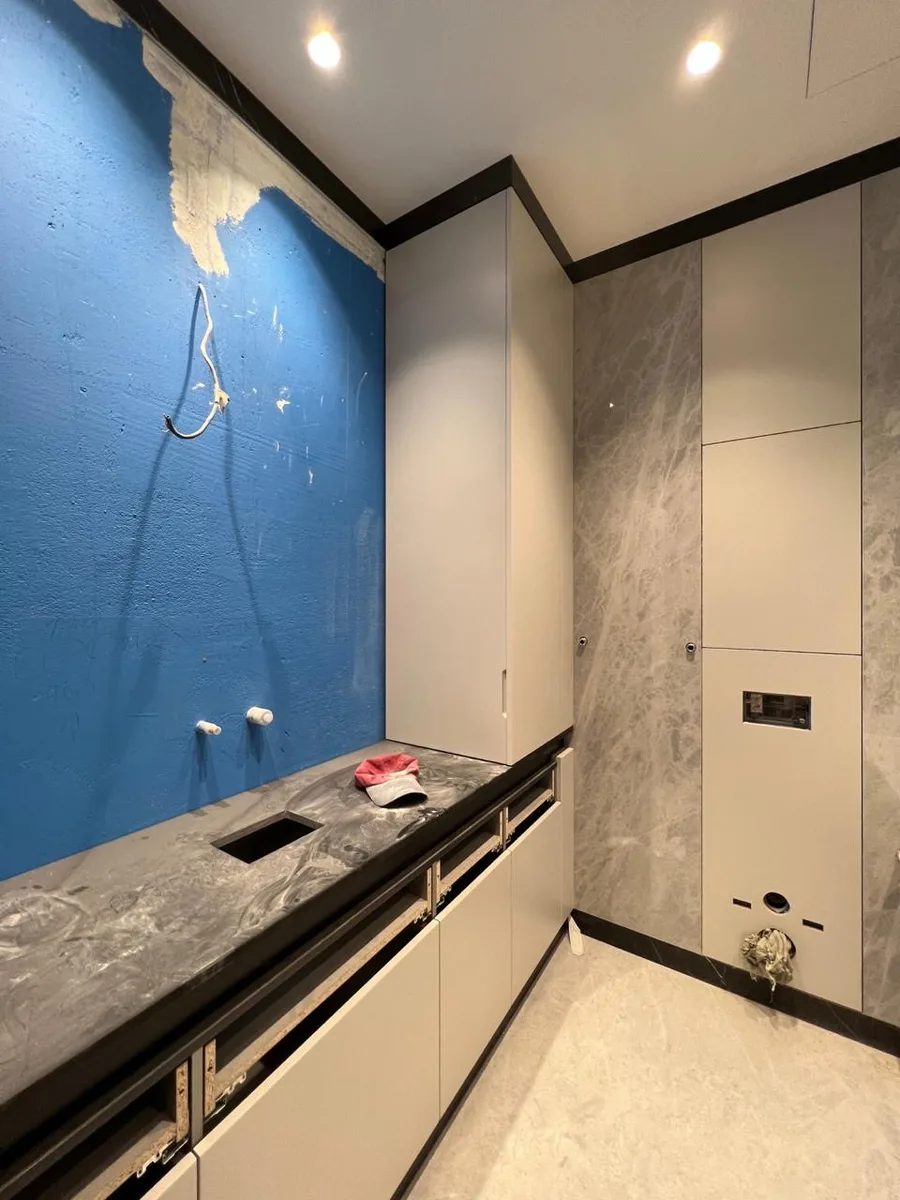
Shot on a phone
What must stay: the tall cabinet, the dark countertop, the toilet niche on the right, the marble wall and the black ceiling trims. We list all of it in every request – otherwise the AI may “improve” these too.
Step 1. Two finish directions
The first request is warm: a light travertine-look wall, an oval vessel sink, a brass wall-mounted faucet, an oval backlit mirror. The second is dark: graphite microcement, an undermount sink, a black deck-mounted faucet, a mirror in a black frame and a black toilet.
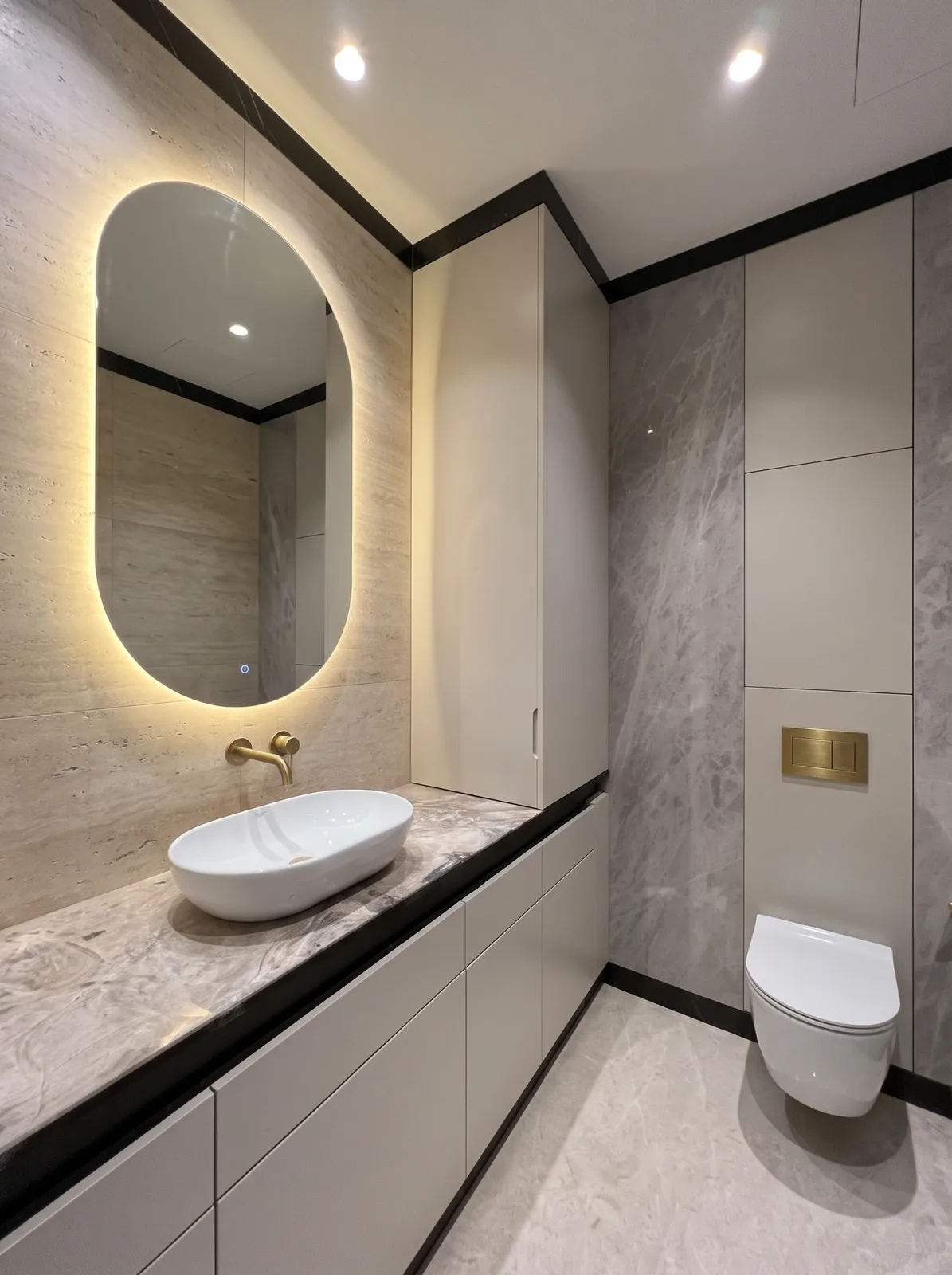
Travertine and brass, 70 s
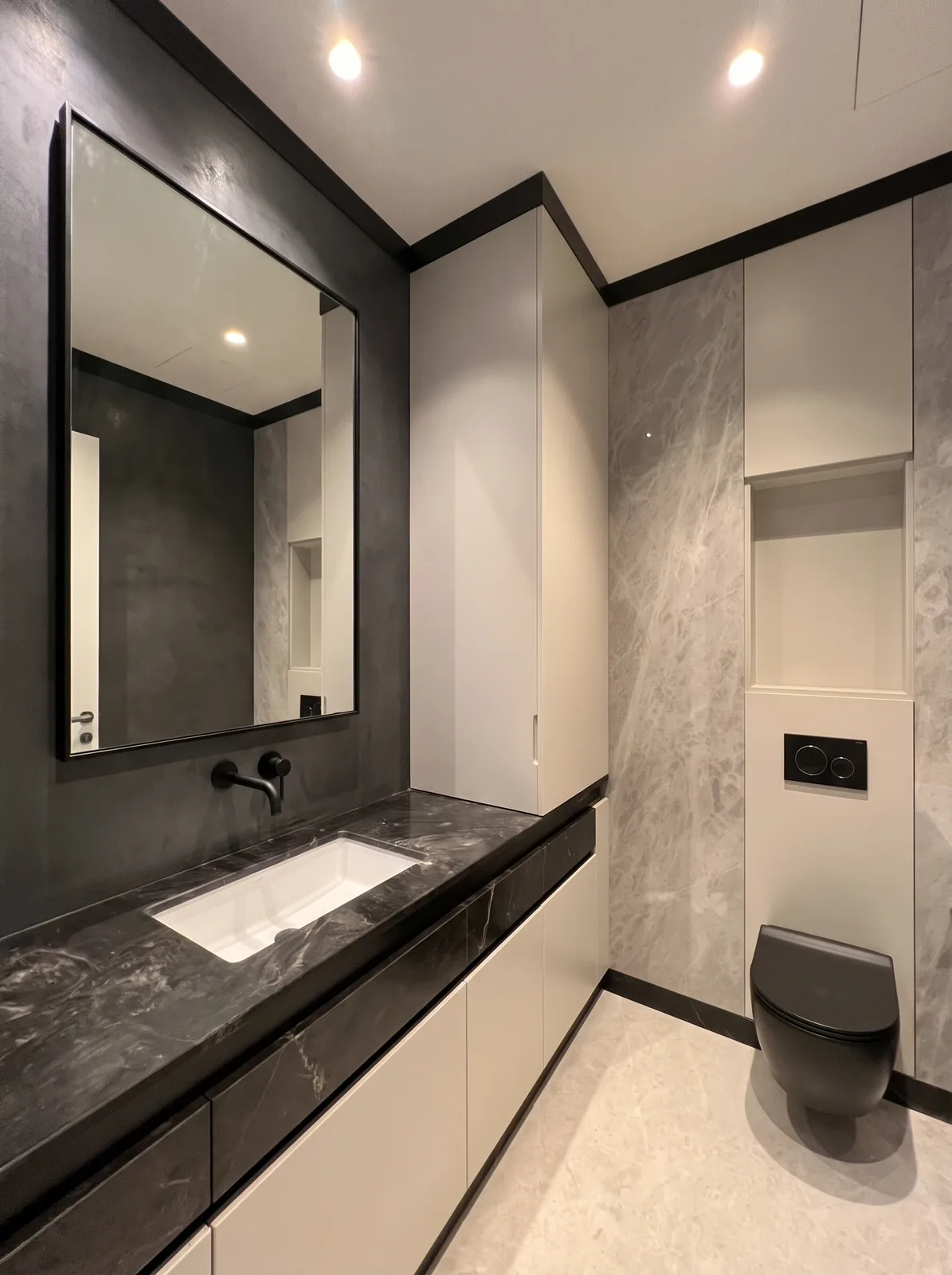
Graphite and black, 87 s
- Both times the tall cabinet, countertop, marble wall, niche and black trims are in place. Same angle – the client recognizes their own bathroom.
- The warm option matches the request exactly – even the flush plate is brass, as asked.
- The dark option has two deviations: the faucet became wall-mounted instead of deck-mounted, and an open shelf niche appeared above the toilet. Tell the client or make another variant.
A third direction – grey marble and a round mirror – is in the article “Same request, three AI models”, along with how GPT Image and Nano Banana 2.1 handled the same photo.
Step 2. The warm one is chosen – a close-up
We picked travertine. To show the materials up close, we sent the finished image back to the AI with a request: a close-up of the sink and faucet, a 50 mm lens, towels and soap on the countertop.
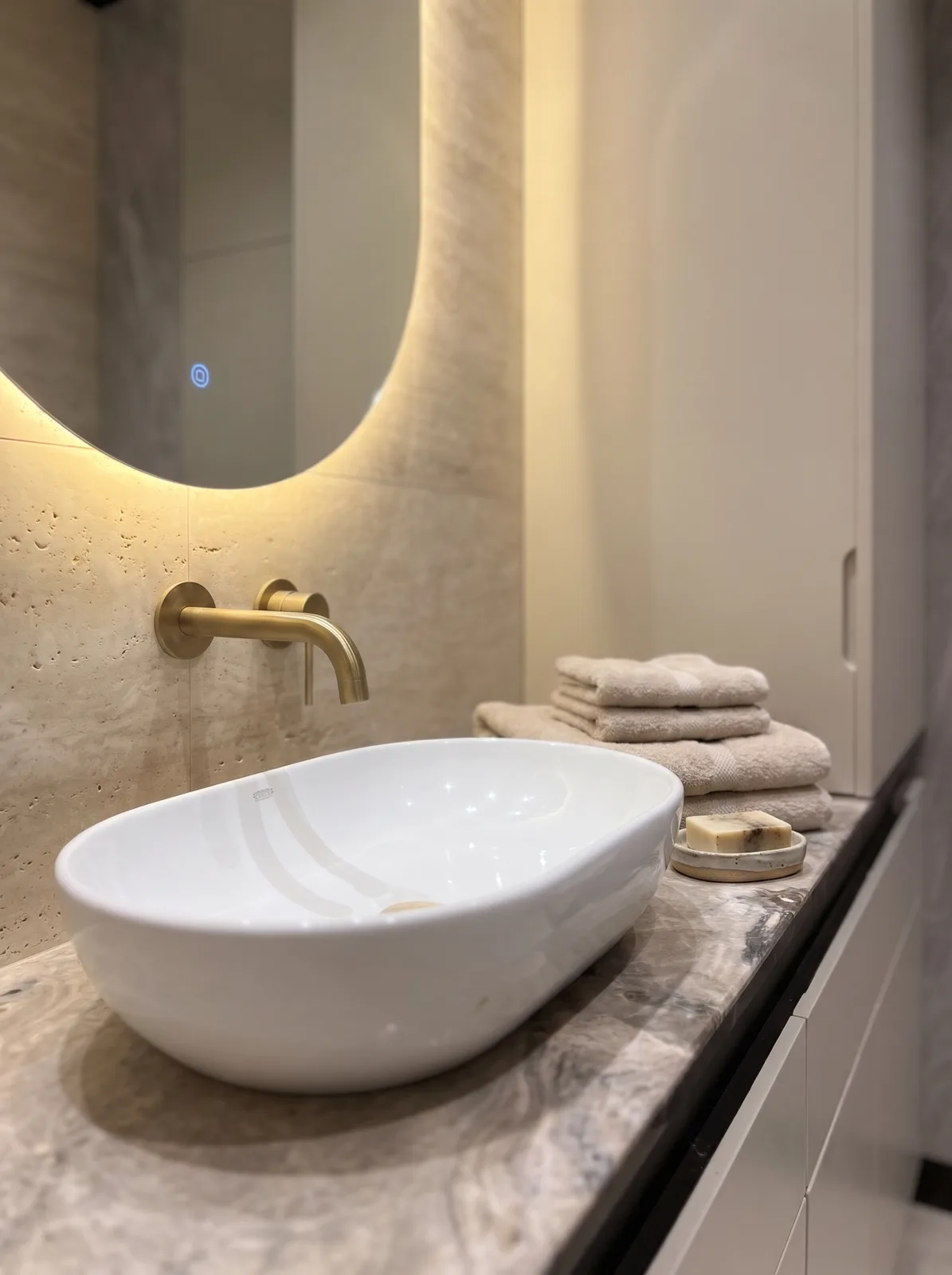
Close-up, 46 s
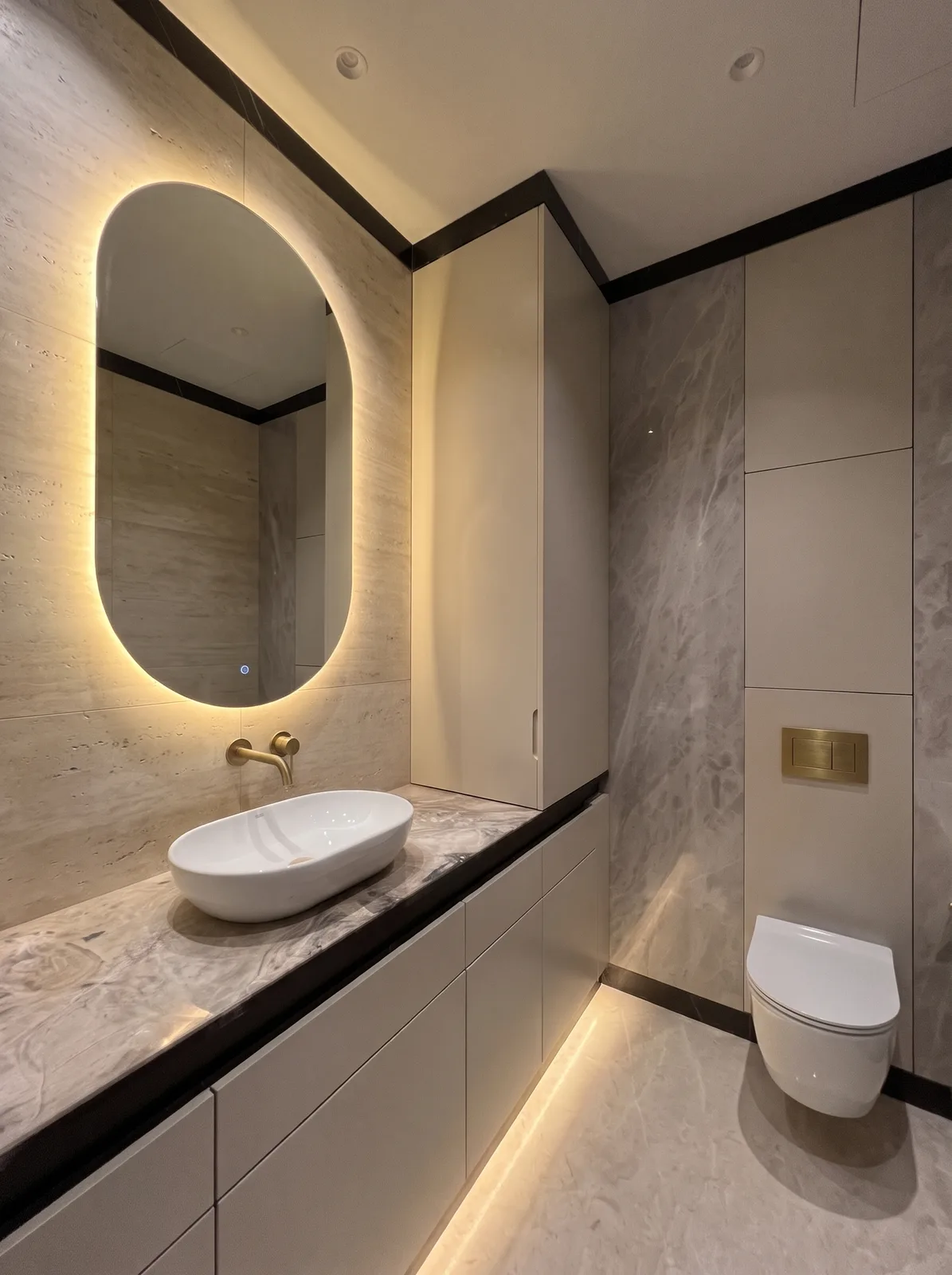
Evening, 46 s
The sink, faucet, mirror and stone match the wide shot – you can see the travertine pores and the countertop veining. This shot works well in a presentation next to the wide view.
Step 3. Evening light – and a failure on the way
The request: change nothing, dim the spotlights, keep the mirror backlight and warm under-cabinet lighting. The first attempt failed – the model replied “provider temporarily unavailable”. That's a failure on its side, not a mistake in the request: a retry right after it produced the image in 46 seconds.
Finishes and fixtures stayed the same, the light is as requested, and a warm strip appeared under the cabinets. But the AI slightly simplified the niche on the right – small differences between shots of one series always happen.
The numbers
| Step | Time | Price |
|---|---|---|
| “Travertine” option | 70 s | 10 credits ($0.37) |
| “Graphite” option | 87 s | 10 credits ($0.37) |
| Close-up | 46 s | 10 credits ($0.37) |
| Evening light (second attempt) | 46 s | 10 credits ($0.37) |
| Total | about 4 minutes of waiting | 40 credits ($1.46) |
Nano Banana Pro, 2K. In brackets – in money on the Start plan.
For print or a large screen the chosen image can be upscaled to 4K by the same model – the “Download in 4K” button, 10 credits.
Takeaways
- A construction-site photo works: the AI removes wires, debris and bare walls on request.
- List what to keep in every request – even if the AI kept it last time.
- Make 2 directions and show the client both: choosing between options is faster than revising one.
- Details and light – as separate requests on the finished image: that way the materials stay the same.
- Check the result against the request: the AI may silently swap a faucet or add a shelf.
More room photo examples are in the article “Redesign a room from a photo” and on the AI room design page.
FAQ
Can AI design a bathroom from a photo?
Yes. Photograph the bathroom as it is – even mid-renovation – and describe the finishes and fixtures. The AI keeps the walls, cabinets and camera angle and shows the finished bathroom. It's a visualization of the idea: tile layout and fixture sizes are still checked by the designer.
How much did this case cost?
4 Nano Banana Pro images at 2K – 40 credits, which is $1.46 on the Start plan. A failed attempt caused by the model isn't charged.
Why did the AI change the faucet I asked for?
The AI sometimes picks the “usual” option: in our case it installed a wall-mounted faucet instead of a deck-mounted one. Repeating the important part as a separate sentence (“the faucet stands on the countertop, not on the wall”) and making another variant helps.
Can I show the same bathroom from another angle?
A close-up from the same image works well – materials and fixtures match. But a view from another point in the room will be invented: the AI doesn't know what isn't in the photo. For another angle, photograph the bathroom again.